 Trackdown
Trackdown
Trackdown
Hunt down lost earbuds, speakers, and other Bluetooth devices by signal strength — a hot-and-cold radar that guides you the last few meters.
Coming soon to theApp Store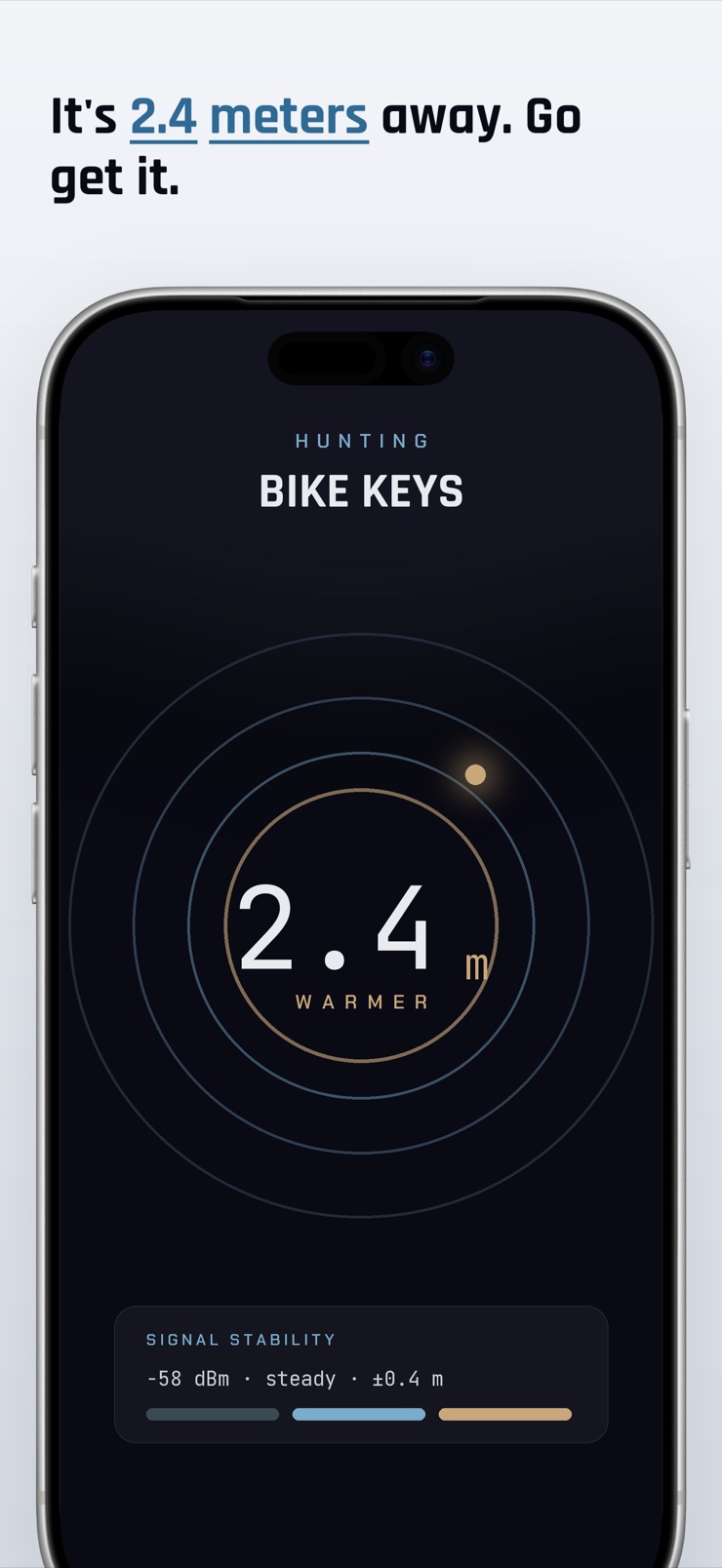
Trackdown is a Bluetooth finder for iPhone. It scans for nearby Bluetooth devices and turns their signal strength into a live proximity readout — a radar dial that warms from blue to gold as you close in. You walk, the signal changes, and the app tells you whether you are getting warmer or colder.
Unlike finders that only work with paired accessories, Trackdown ranges any device that is broadcasting a Bluetooth signal. That matters because a lost earbud is usually the one you can no longer connect to. The readings are smoothed and shown honestly: an estimated distance, the raw dBm value, and a stability indicator, so you know how much to trust each number.
Trackdown also keeps an eye out for you. It flags unknown Bluetooth trackers that keep appearing near you over time and across places, and it drops a map pin where a device's signal was strongest — so even a dead battery leaves you a starting point. Everything runs on your iPhone.
A live radar dial converts signal strength into proximity. It shifts from cool blue to warm gold as you get closer, with a WARMER/COLDER trend so every step gives feedback.
Trackdown scans all nearby Bluetooth broadcasts, not just accessories paired to your phone. No connection required — which is exactly the situation when something is lost.
See the estimated distance in meters, the live dBm reading, and a signal-stability band. Smoothed readings replace the wild jumps that make raw Bluetooth distance useless.
Trackdown notices small Bluetooth trackers that show up near you repeatedly — across time and different locations — and flags them, for example: seen 4 times over 35 minutes at 2 stops.
When a device goes quiet, Trackdown keeps a pin on the map where its signal peaked, plus a heat trail of the search. A dead battery still leaves you a place to start.
When the target supports Ultra Wideband ranging, Trackdown switches from signal strength to a directional arrow with precise distance, and falls back gracefully when it doesn't.
Trackdown lists every Bluetooth device in range, closest first, with distance estimates and live signal readings.
Select your earbud, speaker, or other device from the list. No pairing or connection is needed — a broadcast signal is enough.
Walk slowly and watch the radar. The dial warms from blue to gold and the distance drops as you close in on the signal.
If the signal fades or the battery died, open the map to see where the signal was strongest and resume the search from there.
If the device still has battery, it usually keeps broadcasting a Bluetooth signal that your iPhone can detect within roughly 10 to 50 meters indoors. The reliable method is to move through the space and watch how the signal strength changes — stronger means closer. Trackdown turns this into a hot/cold radar: pick the device from the scan list and walk until the dial turns gold and the distance reads under a meter.
Yes. iPhones can scan for Bluetooth Low Energy devices that are advertising nearby — earbuds, speakers, trackers, and many other gadgets — without connecting to them. The system doesn't show this list to you directly, though. Trackdown surfaces it: every broadcasting device in range, sorted closest first, with an estimated distance and live signal reading for each.
You usually can't connect to a lost earbud — it's out of your other devices' range or already bound elsewhere, and that's precisely the problem. The good news is that connecting isn't necessary: a powered earbud typically still broadcasts a Bluetooth signal. Trackdown ranges devices by that broadcast alone, so you can hunt an earbud you cannot pair with, as long as it has battery and is transmitting.
Bluetooth signal strength gives a proximity estimate, not a GPS-style location. Expect it to tell you 'within this room' and 'getting warmer,' with distance figures that are honest approximations — walls, furniture, and your own body all bend the numbers. Trackdown smooths the readings and shows a stability band so you know how much to trust them, and for accessories that support Ultra Wideband it switches to genuinely precise direction and distance.
RSSI (received signal strength indicator) is how loudly your iPhone hears another device's radio, measured in dBm — values closer to zero, like -50, mean nearer; values like -90 mean far. Because signal strength falls off with distance, tracking RSSI while you move works like a hot-and-cold game. Trackdown does the math for you: it filters the noisy raw values and presents a steady distance estimate and trend instead of a jumping number.
No — a device that isn't powered doesn't transmit, so nothing can range it in real time. What you can still use is history. Trackdown drops a pin on the map at the spot where the device's signal was strongest before it went quiet, along with a heat trail of your search, so you have a concrete place to start looking instead of guessing.
The telltale pattern is the same unknown device appearing near you repeatedly — over time and across different places. One sighting in a cafe means nothing; the same tracker seen at home, at work, and on your commute is worth attention. Trackdown watches for this pattern and flags devices that move with you, for example 'seen 4 times over 35 minutes at 2 locations.' No app can promise to catch every tracker, so if you feel unsafe, contact local authorities.
Yes. Because Bluetooth Low Energy advertising is a common standard, a scanner can detect broadcasts from devices of any brand — earbuds, speakers, fitness bands, trackers, and more. Trackdown is brand-agnostic by design: it lists everything transmitting in range and lets you range any of them by signal strength, whether or not it was ever paired to your phone.
Typical Bluetooth Low Energy range is about 10 to 50 meters indoors and up to 100 meters or more with clear line of sight, though walls, metal, and interference cut this sharply. If a scan shows nothing, widen the search: walk the space in a grid, and re-scan in each area. Once Trackdown picks the device up at the edge of range, the hot/cold dial takes over for the final approach.
Raw Bluetooth signal strength is inherently noisy — reflections off walls, your body blocking the antenna, and radio interference can swing readings by a large margin from one second to the next. Apps that display raw values produce distances that leap from 3 meters to 20 and back, which is useless for searching. Trackdown filters and smooths the signal, shows the trend rather than every spike, and displays a stability indicator so you can tell a solid reading from a shaky one.
Usually yes, with one condition: the earbud must be powered and broadcasting. An earbud that fell out of your ear typically keeps transmitting until its battery drains, so a signal scanner can range it. An earbud sealed inside its charging case often stops advertising, in which case you'd search for the case instead. Trackdown lists whatever is transmitting, so a quick scan tells you immediately whether the earbud is still findable.
Ultra Wideband (UWB) is a radio technology that measures distance by signal travel time rather than loudness, which makes it far more precise than Bluetooth signal strength — down to centimeters, with direction. Recent iPhones include a UWB chip. When the device you're hunting supports it, Trackdown switches from the hot/cold radar to a directional arrow with exact distance, and falls back to signal-strength ranging for everything else.
Yes. Trackdown records where each tracked device's signal was strongest and keeps that as a last-seen pin on the map, together with the peak signal value and a cold-to-warm trail of the search. This is the practical answer for a device that went out of range or ran out of battery: return to the pin, start a fresh scan there, and follow the dial.
Scan, follow the dial, and go get your stuff back.
Coming soon to theApp Store